Superfan: College Football
4.81.02KReviews
Analysis ByAppCompare
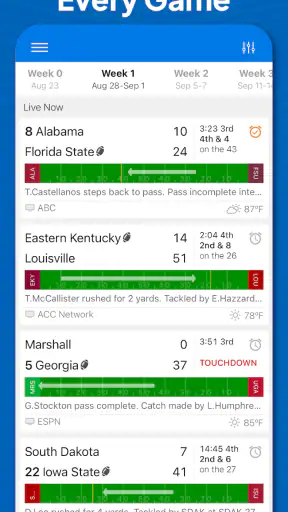
On a college football Saturday, I usually begin with one simple problem: I want the important information quickly, but I do not want to jump between a score app, a rankings page, a schedule, and a news feed. Superfan: College Football is built for that exact situation. It is a free sports app from Superfan Sports that brings live scores, play-by-play, statistics, schedules, CFP rankings, and injury information into one place. After spending time with it, I see it less as a general sports portal and more as a focused companion for following college football as events unfold.
The first thing that stood out to me was its focus. This is not trying to be a broad destination for every sport, and that is a strength if college football is the sport you actually follow. The app is aimed at fans who want to keep several games in view, understand how a game is changing, and check the wider picture without constantly searching the web. Its store rating sits at 4.8 from roughly 9,400 ratings, and that level of response makes sense to me because the app solves a very specific problem rather than trying to do everything.
From a busy Saturday to a useful game-day routine
Starting with the right question
My normal starting condition is not always “I want to watch one game.” More often, I am cooking, traveling, watching another match, or checking a phone during a break while several college football games are happening. In that situation, a final score is not enough. I want to know whether a team is controlling possession, whether a comeback is real, what happened on the latest drive, and whether an injury might change the rest of the game.
Superfan: College Football fits that mindset because its information is organized around the sport rather than around a single news story. I can begin with the schedule, identify the games that matter to me, and then move into a live game view when something catches my attention. That feels more efficient than opening a browser, searching for a matchup, and then trying to work out which page contains the most current detail.
The app is also useful when I am planning ahead. A schedule is not only something I check after kickoff. I use it to see what is coming, compare the day’s matchups, and decide which games deserve a closer look. For a fan who follows a particular team but also wants awareness of the national picture, that transition from team-specific interest to broader college football coverage is one of the app’s best qualities.
Moving from schedule to live detail
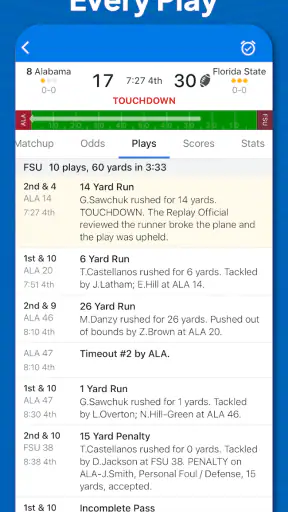
My preferred workflow is to start with the schedule, choose a game, and then treat the live screen as the working dashboard. The score tells me the immediate outcome, while play-by-play gives the sequence behind it. That distinction matters. A team can be ahead while playing poorly, or trail while steadily improving field position. Reading the recent plays gives me a better sense of the game’s shape than a score alone.
I find play-by-play especially helpful when I join a game late. Instead of trying to reconstruct the action from social posts or waiting for a commentator to summarize it, I can move through the listed events and see how the score developed. This is a practical advantage for people who cannot watch continuously. It turns the app into a catch-up tool, not just a place to glance at numbers.
My advice is to avoid treating every play as equally important. I look first at the score change, the latest possession, and any obvious swing in momentum, then use the surrounding entries to understand the context. That small habit makes the live feed easier to scan and prevents the detail from becoming noise during a crowded game window.
Using statistics to test the first impression
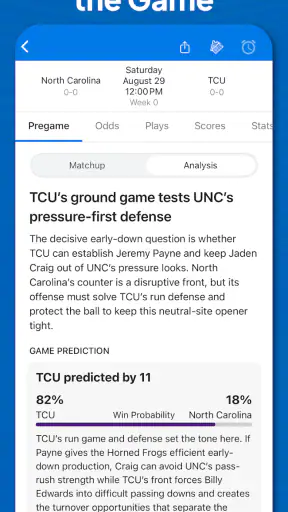
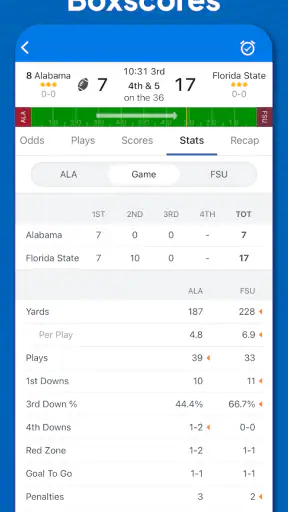
Statistics are most useful to me after I have formed an initial impression from the score and play-by-play. If a team is leading comfortably, I want to know whether the numbers support that advantage or whether the score is hiding a few unusual plays. If the margin is close, the statistical view can show whether the game is genuinely balanced or whether one side is moving the ball more consistently.
This is where the app feels more useful than a basic scoreboard. A simple score service answers “who is ahead?” Superfan: College Football gives me more material for asking “why?” That does not turn it into a full coaching analysis platform, and I would not use it as a substitute for watching the game, but it provides enough context for a fan who wants more than a headline result.
One effective routine is to check the statistics only at natural pauses rather than refreshing them after every play. I look after a quarter, at halftime, or when the game has clearly shifted. That keeps the numbers connected to a meaningful stretch of football and makes it easier to notice trends instead of reacting to every small change.
Bringing rankings and injuries into the same decision
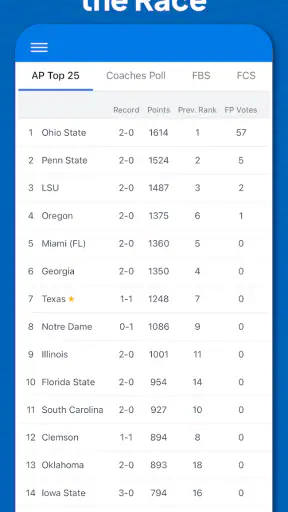
The CFP rankings add a second layer to the workflow. They help me understand why a particular game matters beyond its current score. A close result involving ranked teams can affect the wider conversation, while an unexpected loss may change how I view the rest of a team’s schedule. Having rankings available beside game information saves me from switching to a separate source whenever the national picture becomes relevant.
Injury information is similarly valuable because it connects the immediate game to what may happen next. When I am deciding whether a team’s recent performance is likely to continue, an injury update can change the interpretation. I treat it as context rather than certainty: it may explain a lineup change or a weaker performance, but it does not tell me exactly how the next game will unfold.
A useful handoff happens here. I move from the live event to the season-level question: does this result affect a team’s standing, and are injuries likely to influence its next appearance? The app supports that movement better than a single-purpose score tracker, because I can go from the field-level sequence to rankings and team condition without leaving the college football environment.
Passing information to someone else
Real sports use rarely happens in isolation. I might be following a game while a friend asks for an update, or I may need to explain why a matchup has become important. In those moments, I use the score for the quick answer, play-by-play for the immediate explanation, and statistics or rankings for the larger context. That creates a simple handoff from the app to a conversation.
The important limitation is that the app does not replace the human part of following a sport. I still need to interpret what the numbers mean and decide which details are worth sharing. That is not a flaw in itself, but it means the app works best for fans who enjoy making sense of information rather than people who only want a polished stream of commentary.
For a group watching different games, the app can also act as a neutral reference point. Instead of relying on a vague message such as “they are dominating,” I can check the current score, recent plays, and available statistics before responding. That makes discussions more precise, particularly when a game is close and everyone is following from different locations.
What the finished result looks like
By the end of a game, I can use the same flow in reverse. I start with the final score, review the decisive sequence in the play-by-play, and then look at the statistics to see whether the result matches the overall performance. Rankings provide the broader consequence, while injury information may help explain what to expect from the team afterward.
That gives me a more complete result than simply knowing who won. I can leave the app with a compact understanding of the game: what happened, when it changed, which side performed better in the available numbers, and why the outcome may matter beyond that afternoon. For a college football fan who follows several teams, this is a meaningful time saver.
I also appreciate that this workflow works at different levels of attention. I can spend a few seconds checking a score, a couple of minutes reading the latest plays, or longer comparing the game with rankings and statistics. The app does not force every visit to become a deep research session, which is important when I am using it between other activities.
Where the flow becomes less comfortable
The same concentration that makes the app useful can make it feel narrow. If I want coverage of professional football, other sports, or a broad sports-news experience, this is not the natural choice. A general sports app may be better for someone who wants one place for many leagues and competitions. Superfan: College Football makes more sense when college football is the main reason I am opening the app.
There is also a difference between information density and ease of interpretation. Play-by-play, statistics, rankings, and injuries are useful, but a new fan may not immediately know which detail deserves attention. The app gives me the ingredients for understanding a game; it does not remove the need to read them in context. Someone who prefers short editorial summaries may find a traditional sports news service more comfortable.
Another trade-off is that the most valuable information is tied to live or changing events. During a quiet period, the app may feel less essential than it does during a full slate of games. I would not open it expecting an all-purpose college football magazine. I use it as a practical reference tool whose value rises when games are being played or when I am checking schedules, rankings, and team conditions.
People also ask whether it is suitable for casual use. I think it is, provided “casual” means someone who occasionally wants reliable game context rather than someone who only wants a single final score. The schedule and score functions are approachable, while the deeper material is there when curiosity grows. If a user finds statistics distracting, they can simply stay with the basic game information and use the advanced sections selectively.
It is free to download, although the app includes in-app purchases ranging from $1.99 to $12.99 per item. That is worth keeping in mind before assuming every part of the experience is covered in the same way. I would begin with the free experience and decide whether any optional purchase genuinely improves my routine. The presence of purchases does not make the app unsuitable, but it does make it sensible to pay attention during the download and setup process.
Device fit, maturity, and everyday practicality
The app has been available since September 2015, which gives it the feel of an established product rather than a newly launched experiment. Superfan Sports has continued it through version 13.5.2, and the current release is compatible with operating systems from version 9 onward. For many users that makes installation straightforward, though anyone using an older device should check compatibility before planning to rely on it for game day.
Its Teen content rating is also a useful signal about the intended audience. I see it as a fan-oriented sports information app rather than a children’s product. Parents choosing apps for younger users should consider that rating in the same way they would with any sports service, especially if the device is shared.
The app has passed half a million installs, so it is not an obscure tool with a tiny audience. Still, popularity alone is not why I would recommend it. The stronger reason is the way its separate information types connect: schedule to game, game to play sequence, sequence to statistics, and statistics to rankings or injuries. That chain is what makes it useful in practice.
Who should use it, and who should choose something else
I would recommend Superfan: College Football to a fan who follows one or more college teams, checks several games on the same day, and wants more than a final score without committing to a full news-reading session. It is particularly suitable for someone who watches intermittently and needs a quick way to reconstruct what happened during the minutes they missed.
I would also suggest it to a fan who enjoys comparing the immediate game with the larger postseason picture. The combination of live information and CFP rankings makes it easier to connect a Saturday result with the questions that follow: how significant was the win, what does the loss mean, and which teams deserve closer attention next?
I would steer away from it if your priority is live video, extensive written analysis, or coverage across many unrelated sports. A broader sports platform may provide a better single-app solution in that case. I would also choose a simpler scoreboard if I only needed occasional final scores and had no interest in play-by-play, statistics, rankings, or injuries. Paying attention to that distinction can prevent downloading an app that is more detailed than your actual needs.
My final take after using the full workflow
Superfan: College Football works because it follows the way I actually investigate a game. I begin with a schedule or a score, move into the sequence of plays, check statistics when the result needs explanation, and then use rankings or injuries to understand the wider consequence. The information can be handed from the app to a conversation, a viewing decision, or a plan for the next game without forcing me to search several unrelated services.
It is not perfect for every type of sports fan. Its college-football focus is a benefit for specialists and a limitation for everyone else, while the amount of information may feel excessive if all you want is a quick result. Optional purchases also deserve a careful look before you spend anything. Even with those reservations, I find the central workflow coherent and genuinely useful.
For me, the best reason to install it is not any single feature. It is the ability to move from “what is happening?” to “why is it happening?” and finally to “what does it mean?” without losing the thread. If that is the kind of college football companion you want, this free sports app from Superfan Sports is an easy recommendation. Its real strength is turning scattered game-day questions into one practical routine.
FAQ
What is Superfan: College Football?
Superfan: College Football is a mobile app focused on following college football in one place. It is designed for fans who want access to team information, schedules, scores, news, rankings, game updates, and other competition-related content. The exact features and available coverage may vary depending on the season, conference, school, and the user’s device or location.
Can I use Superfan: College Football to follow live games and scores?
The app is intended to help users keep track of college football games through schedules, score updates, results, and notifications. However, it should not automatically be considered a complete live-streaming service. Some games may include live information or links to viewing options, while video availability can depend on broadcasting rights, regional restrictions, subscriptions, and the specific event.
Does Superfan: College Football support my favorite college team?
The app’s usefulness depends largely on the teams and competitions included in its current database. Popular college football programs and major matchups are generally the primary focus, but coverage can change over time. Before downloading, check the app listing, supported competitions, and available team pages to confirm that your school and preferred conference are represented.
Are notifications available in Superfan: College Football?
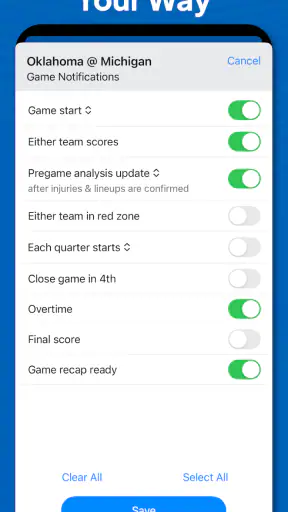
Superfan: College Football may offer alerts for upcoming games, score changes, final results, news, or other team activity, making it easier to follow a season without constantly opening the app. Notification options can differ by platform and version. After installation, review the app’s settings and your phone’s permission controls so you can choose which alerts to receive.
Is Superfan: College Football free to download and use?
The app may be available as a free download, but users should review its store listing for possible advertisements, optional purchases, subscriptions, or premium features. Costs and terms can change between Android and iOS versions. If the app requests payment, carefully check the billing period, renewal conditions, and cancellation instructions before confirming any subscription.
Pros
- Quick access to college football news
- scores
- and team updates.
- Useful for following multiple schools from one app.
- Fan-focused content makes it easy to stay engaged during the season.
- Personalized team coverage can reduce time spent searching for updates.
- Helpful companion for tracking games while away from the TV.
Cons
- Coverage and features may vary depending on the teams you follow.
- Frequent notifications can become distracting during busy game days.
- Some content may feel repetitive for fans following only one team.
- Live updates depend on a stable internet connection.
- The app may offer less value during the college football offseason.